Simulator & Simulation Life Cycle
Overview
The Simulator is the central object that drives a pySimBlocks simulation.
It takes a Model and a
SimulationConfig, and executes the block
diagram step by step until the end time is reached.
A simulation goes through three successive stages:
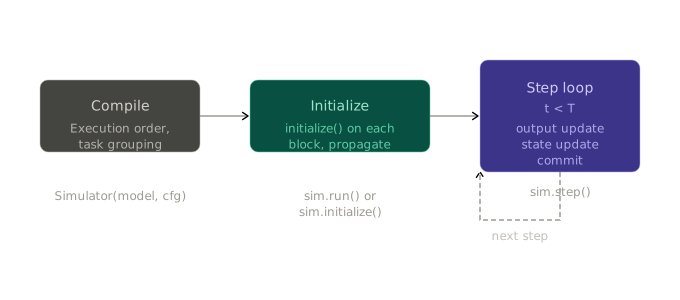
sim = Simulator(model, sim_cfg)  # triggers _compile()
logs = sim.run()                 # triggers initialize() then step loop
Compilation phase
_compile() is called automatically when the Simulator is instantiated.
It prepares everything needed to run the simulation loop and raises immediately
if the configuration is invalid.
Three things happen in sequence:
1. Execution order. The block graph is sorted topologically to determine
in which order output_update() is called each step. See
Execution Order and Algebraic Loops for details.
2. Task grouping. Blocks are grouped by effective sample time into
Task objects. Each task owns an ordered
subset of the global execution order and tracks its own activation schedule.
Blocks with no explicit sample_time inherit the global dt.
3. Time manager. A
FixedStepTimeManager is
created and validates that all block sample times are integer multiples of
dt. If any is not, an error is raised before the simulation starts.
Note
Only "fixed" step is currently supported. Variable-step raises
NotImplementedError.
Initialization phase
initialize() is called once before the step loop starts, either automatically
by run() or manually when using an external clock.
It iterates over all blocks in execution order, calls block.initialize(t0),
then immediately propagates the block’s outputs to its downstream inputs.
This ensures that every block enters the first step with consistent input values.
Once all blocks are initialized, each task refreshes its list of stateful
blocks — those whose state_update() must be called each step.
Note
If any block raises during initialize(), the error is re-raised immediately
with the block name, and the simulation does not start.
Simulation step
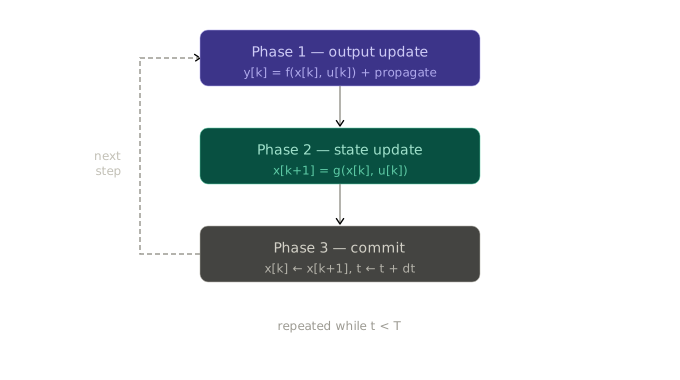
Each call to step() executes three phases in strict order, applied only
to the tasks active at the current time t.
Phase 1: Output update & propagation
For each active task, blocks call output_update(t, dt) in topological order.
Each block computes its output y[k] — from x[k] if it has state,
from u[k] if it has direct-feedthrough, or from both. Then its outputs are
immediately propagated to the inputs of downstream blocks.
The propagation happens block by block, not after all blocks have run. This
ensures that each block receives up-to-date inputs before its own
output_update() is called.
The topological order guarantees that for any block with direct-feedthrough, its upstream blocks have already computed their outputs at the same step. See Execution Order and Algebraic Loops for how this order is built and what happens when a cycle is detected.
Phase 2 — State update
For blocks that have internal state, state_update(t, dt) computes x[k+1]
from x[k] and u[k] and stores it in next_state. Stateless blocks
(e.g. Gain, Sum) skip this phase entirely.
Phase 3 — Commit
For blocks that have internal state, next_state is copied into state:
x[k] ← x[k+1]. The simulation clock then advances: t ← t + dt.
After commit, the step is complete and the scheduler determines which tasks are active at the next tick.
Multi-rate scheduling
A pySimBlocks model can mix blocks running at different sample times. A controller might run at 10 ms while a slower observer runs at 50 ms, both coexisting in the same diagram.
Tasks and sample times
During compilation, blocks are grouped by effective sample time into
Task objects. Each task owns the subset
of blocks sharing its sample time and tracks its own activation schedule
independently.
Blocks with no explicit sample_time inherit the global dt from
SimulationConfig. All sample times must be integer multiples of dt —
this is validated at compile time.
Scheduler activation
At each tick, the Scheduler checks
which tasks are due to run. A task runs if t >= next_activation. After
execution, its next_activation advances by one period.
For a model with dt=10ms, a fast task at 10 ms and a slow task at 50 ms:
t (ms) |
fast task |
slow task |
|---|---|---|
0 |
runs |
runs |
10 |
runs |
— |
20 |
runs |
— |
30 |
runs |
— |
40 |
runs |
— |
50 |
runs |
runs |
Blocks in inactive tasks hold their last output — they are neither updated nor propagated until their next activation.