Tutorial 1: First Steps with pySimBlocks
Overview
This tutorial introduces the core concepts of pySimBlocks:
Creating blocks
Connecting signals
Running a discrete-time simulation
Logging and plotting results
By the end of this tutorial, you will be able to build and simulate your own block-based model in Python.
Example File
You can download or view the main example file here:
If you have cloned the repository, the full example lives in
examples/tutorials/tutorial_1_python/.
System Description
We build a simple closed-loop control system composed of three elements:
A step reference
A PI controller
A first-order discrete-time linear plant
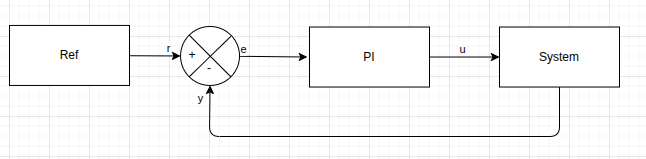
The plant is a discrete-time first-order linear system defined by:
The initial state is \(x[0] = 0\).
The PI controller computes a control command from the tracking error \(e[k] = r[k] - y[k]\):
with the integral state evolving as:
This integral action removes steady-state error for a step reference.
Complete Example
import matplotlib.pyplot as plt
import numpy as np

from pySimBlocks import Model, SimulationConfig, Simulator
from pySimBlocks.blocks.controllers import Pid
from pySimBlocks.blocks.operators import Sum
from pySimBlocks.blocks.sources import Step
from pySimBlocks.blocks.systems import LinearStateSpace


def main():
    """This example demonstrates how to use the pySimBlocks library to create a
    simple closed-loop control system with a step reference input, a PI controller,
    and a linear state-space system.
    """

    A = np.array([[0.9]])
    B = np.array([[0.5]])
    C = np.array([[1.0]])
    x0 = np.zeros((A.shape[0], 1))

    Kp = np.array([[0.5]])
    Ki = np.array([[2.]])

    # -------------------------------------------------------
    # 1. Create the blocks
    # -------------------------------------------------------
    step = Step(
        name="ref",
        value_before=np.array([[0.0]]),
        value_after=np.array([[1.0]]),
        start_time=0.5
    )
    sum = Sum(name="error", signs="+-")
    pid = Pid(name="PID", controller="PI", Kp=Kp, Ki=Ki)
    system = LinearStateSpace(name="system", A=A, B=B, C=C, x0=x0)

    # -------------------------------------------------------
    # 2. Build the model
    # -------------------------------------------------------
    model = Model("test")
    for block in [step, sum, pid, system]:
        model.add_block(block)

    model.connect("ref", "out", "error", "in1")
    model.connect("system", "y", "error", "in2")
    model.connect("error", "out", "PID", "e")
    model.connect("PID", "u", "system", "u")

    # -------------------------------------------------------
    # 3. Create the simulator
    # -------------------------------------------------------
    dt = 0.01 # seconds
    T = 5. # seconds
    sim_cfg = SimulationConfig(dt, T)
    sim = Simulator(model, sim_cfg, verbose=False)

    # -------------------------------------------------------
    # 4. Run the simulation with logging
    # -------------------------------------------------------
    logs = sim.run(logging=[
            "ref.outputs.out",
            "PID.outputs.u",
            "system.outputs.y"
        ]
    )

    # -------------------------------------------------------
    # 5. Extract logged data
    # -------------------------------------------------------
    t = sim.get_data("time")
    u = sim.get_data("PID.outputs.u").squeeze()
    r = sim.get_data("ref.outputs.out").squeeze()
    y = sim.get_data("system.outputs.y").squeeze()

    # -------------------------------------------------------
    # 6. Plot the result
    # -------------------------------------------------------
    fig, axs = plt.subplots(1, 2, sharex=True)
    axs[0].step(t, r, "--r", label="ref", where="post")
    axs[0].step(t, y, "--b", label="output", where="post")
    axs[0].set_xlabel("Time [s]")
    axs[0].set_ylabel("Amplitude")
    axs[0].set_title("Closed-loop response")
    axs[0].grid(True)
    axs[0].legend()

    axs[1].step(t, u, "--b", label="u[k] (pid output)", where="post")
    axs[1].set_xlabel("Time [s]")
    axs[1].set_ylabel("Amplitude")
    axs[1].set_title("PID controller output")
    axs[1].grid(True)
    axs[1].legend()

    plt.show()


if __name__ == "__main__":
    main()
How It Works
The example follows a simple workflow:
Blocks are created.
Blocks are added to a
Model.Signals are connected explicitly.
A
Simulatorexecutes the model in discrete time.Selected signals are logged and retrieved for plotting.
This reflects the core philosophy of pySimBlocks: explicit block modeling
with deterministic discrete-time execution.
About Signal Shapes
All signals in pySimBlocks follow a strict 2D convention:
Scalars are represented as
(1, 1)Vectors are
(n, 1)Matrices are
(m, n)
When logging a SISO signal over time, the resulting array has shape
(N, 1, 1), where N is the number of simulation steps.
For plotting convenience, the example uses:
y = sim.get_data("system.outputs.y").squeeze()
Try It Yourself
To explore the framework further, try:
Changing the controller gains
KpandKiModifying the system dynamics
AandBAdjusting the time step
dtIncreasing the simulation duration
T
Observe how the closed-loop response changes.